Teams share files constantly in chat — a Figma mockup here, a Google Doc there, a PDF dropped into a thread. Nobody organizes them. They just sink. A week later someone asks "where's that design spec?" and everyone starts digging through Slack history.
森 forest is a small self-hosted service that sits in your Slack workspace, listens passively, and builds a folder tree from whatever gets shared — without anyone having to do anything.
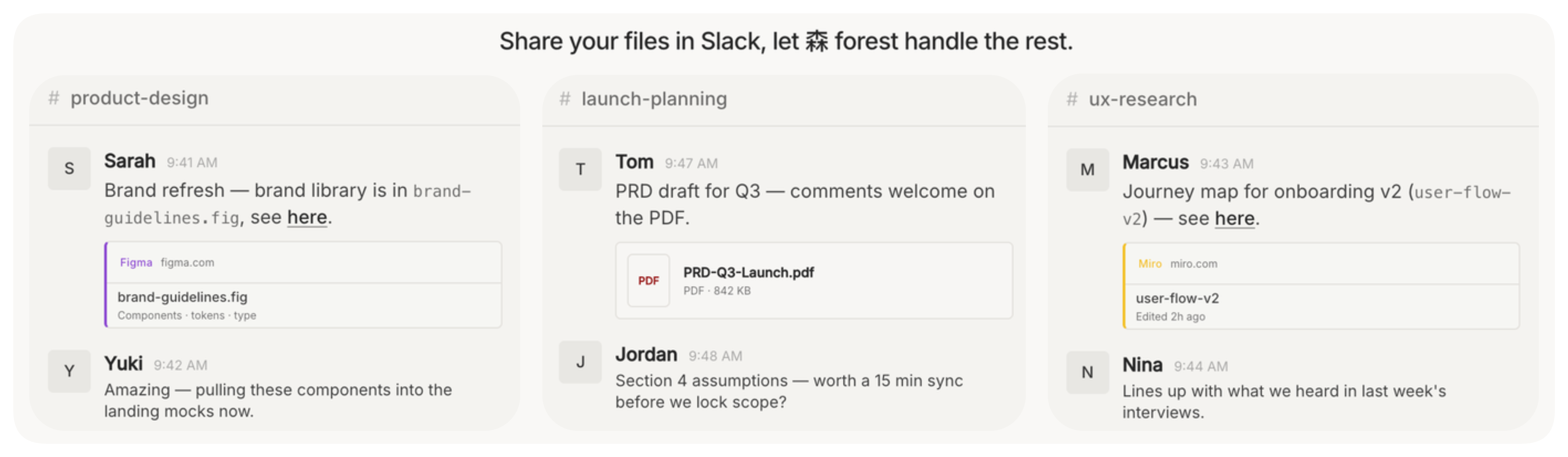
Teams share files in Slack — 森 forest listens and organizes them into a knowledge layer.
The project is released under AGPL-3.0: free to use, modify, and self-host; modifications must stay open if you run it as a network service.
Source and full documentation: github.com/forest-fs/forest.
What it does
When a message containing a link or file attachment lands in a channel 森 forest is watching, it:
- Extracts the URL and any surrounding context from the thread.
- Sends it to an LLM (via any OpenAI-compatible API) to decide what the file is about and where it belongs in the workspace's folder tree.
- Stores the file, its summary, and an embedding in Postgres.
From there you can browse the full tree with @forest show, or ask for a file by context with @forest find:
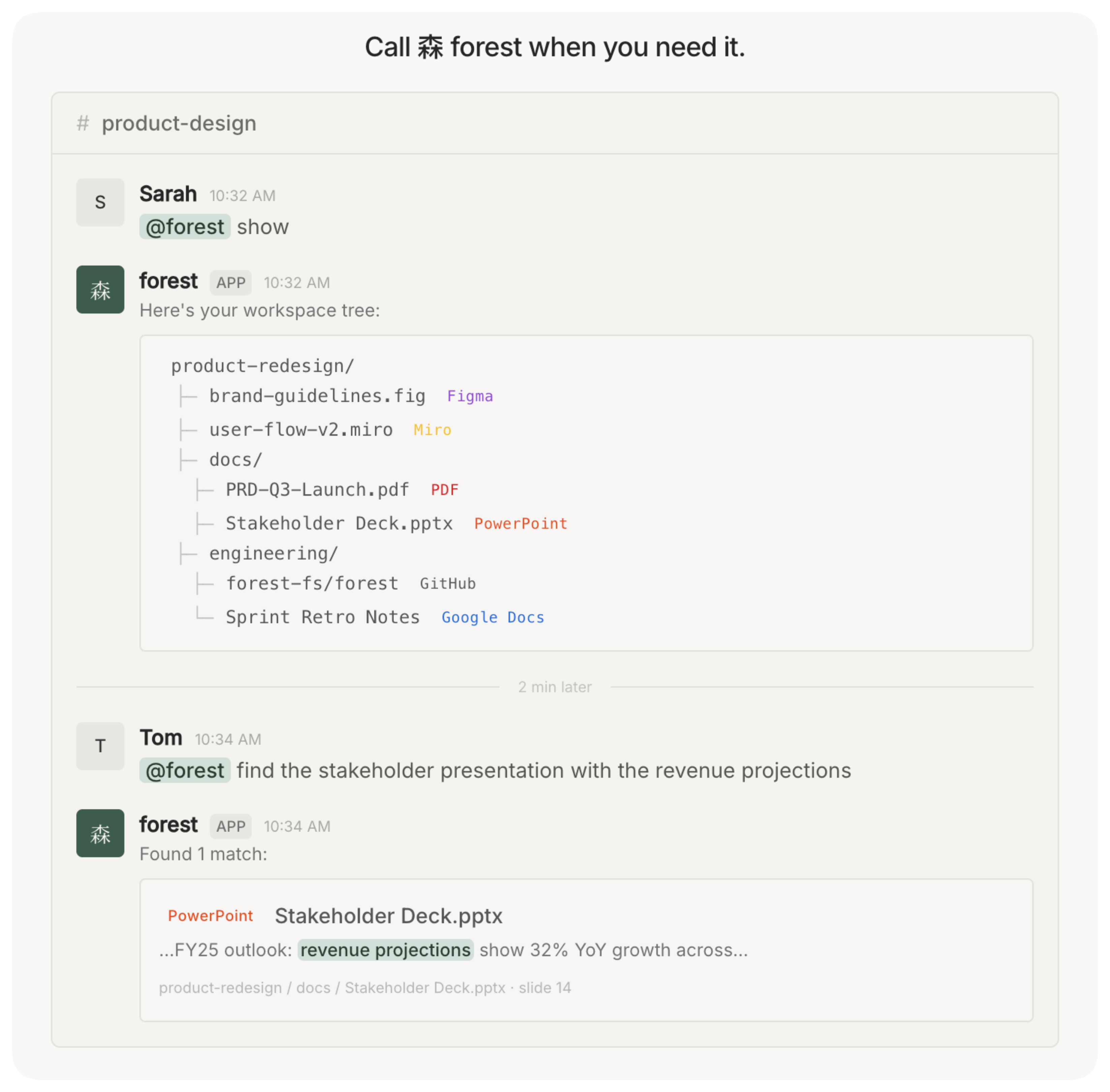
@forest show displays the full workspace knowledge tree directly in Slack.
The key design choice is passivity — 森 forest doesn't ask users to tag, label, or move anything. It just watches and classifies. The overhead for the team is zero.
Architecture
森 forest is a single Python process — FastAPI + Uvicorn — with a thin API layer in front of a service layer of focused modules. The API exposes /slack/events for incoming webhooks and a mention handler for the bot's commands; behind them the work splits across five modules: message routing, ingest, llm access, file_tree management, and search.

森 forest backend architecture: an API layer exposes /slack/events and a mention endpoint, both wired into a service layer of five modules — message, ingest, llm, file_tree, search. The service layer reads and writes PostgreSQL with the pgvector extension, and the llm module calls OpenRouter for chat and embedding requests.
Incoming Slack events flow through message into ingest, which calls llm to classify the file and produce a summary, then persists everything via file_tree. @forest show and @forest find come in through the mention endpoint and route to file_tree and search respectively — search re-uses llm to embed the query at lookup time. PostgreSQL with pgvector sits underneath the whole service layer; OpenRouter sits outside it as the LLM provider.
The ingest path is fire-and-forget on the Slack side: the handler verifies the signing secret, kicks off process_ingest as an async task, and immediately returns 200. That keeps webhook response times under Slack's 3-second deadline regardless of LLM latency.
Storage is PostgreSQL with the pgvector extension. Each file gets a summary (text) and an embedding (vector), which are the foundation for semantic search — letting you ask "the UI mockup Tim and I looked at last week" rather than needing to remember a filename.
The LLM boundary is kept thin: all chat and embedding calls go through a single LLMService wrapping the AsyncOpenAI client. Pointing it at a different provider is one environment variable (LLM_BASE_URL), so you can use OpenRouter, direct OpenAI, Azure, or a local Ollama instance interchangeably.
Self-hosting
森 forest ships as a Docker image. The full stack is a docker compose up away:
For remote deployment it's a single container + managed Postgres — ECS/App Runner on AWS or Cloud Run on GCP both work out of the box. The README has step-by-step CLI commands for both.
Fully Managed
In a fully managed deployment, the OAuth service, ingest queue, backend pool, and PostgreSQL instance are all ours to run — workspaces just install the app and never touch any infrastructure.
A workspace admin finds 森 forest on the Slack App Directory, clicks Add to Slack, and completes the standard OAuth flow. A dedicated OAuth service handles the token exchange and writes a Workspace row scoped to the Slack team ID; every file node, embedding, and folder-tree entry is isolated behind that workspace ID, so there's no cross-tenant leakage.
From there the admin invites @forest to the channels they want monitored and runs @forest init. 森 forest scans the readable message history across all joined channels, builds the initial folder tree via the LLM, and posts a summary back when done. After that, passive ingest runs automatically on every new message with a link or attachment — no further action needed from anyone.

Managed deployment: workspaces install through an OAuth service, then incoming Slack events fan into a queue service that distributes work across an auto-scaling pool of 森 forest backend instances. Each instance runs a dedicated ingest worker and LLM worker, shares a single PostgreSQL database with pgvector (isolated per workspace_id), and calls OpenRouter for chat and embedding requests.
Under load, Slack events fan into a queue service that distributes work across an auto-scaling pool of backend instances. Each instance runs a dedicated ingest worker (classify, summarize, embed, persist) and a separate LLM worker (chat + embedding calls against OpenRouter), so spikes in ingest volume and LLM latency scale independently. All instances share the same PostgreSQL database, with workspace isolation enforced at the row level via workspace_id.
The shared infrastructure means we absorb the operational overhead (container health, database migrations, LLM API keys, rate-limit handling) while users get a zero-config Slack bot. The tradeoff versus self-hosting is data residency: files and embeddings live in our database rather than the team's own cloud account, which is why the self-hosted path exists under AGPL-3.0.
A natural next step: agentic access
The same knowledge layer that helps people find files in Slack is even more valuable to agents. An LLM coding assistant, an internal research agent, a customer-support copilot — they all need org-specific context to be useful, and most have no way to get it. The shape of 森 forest makes the next step obvious: expose the read side over the Model Context Protocol so any agent can plug straight in.
A thin MCP layer in front of the existing service layer is enough. Two tools cover the surface area: a forest_show that walks the workspace's folder tree, and a forest_search that runs semantic lookup against the embeddings — the same two reads @forest show and @forest find already perform from Slack. Any MCP-compatible client (Claude, Cursor, Continue, a homegrown agent) would then have grounded, workspace-specific answers about what the team has actually shared.

Sketch of an MCP front-end for 森 forest: a FastMCP server exposing two tools, forest_show and forest_search, that proxy reads through to the 森 forest backend and its PostgreSQL database with pgvector. Agentic platforms would connect to the MCP server through the same OAuth service used for Slack install, keeping access scoped to the right workspace.
Auth would reuse the OAuth service that already handles Slack install, so MCP access stays workspace-scoped end-to-end: a Claude desktop session for one team would never see another team's tree. The MCP server itself is stateless by design — all reads go through the existing service layer, and all writes still happen via the Slack ingest path — so every passive ingest the team has done would be immediately available to every agent they connect, without 森 forest needing to know anything about those agents.